

Who trusts Sendible to run their franchise network?

From single-region franchises to networks spanning hundreds of locations, multi-location brands rely on Sendible to keep every location on-brand, catch performance issues early, and stay visible in local search — without adding headcount for every new location.

How does Sendible solve franchise and multi-location growing pains? 


Franchise and multi-location brands hit the same six growing pains as they scale: inconsistent branding, repetitive manual posting, blind spots until a customer complains, slow onboarding of new locations, tension between local freedom and central oversight, and invisibility in local search. Sendible answers each one directly — see how, row by row, below.

The problem
How Sendible solves it
Every location does its own thing on social, and the brand starts looking inconsistent across town — or across the country/s.
Route every post through Approval Workflows before it goes live, and give every location the same starting point with a shared, centrally-managed Content Library.
Writing, or approving, the same post 50 times over, once per location, eats up the week.
Write it once. On Elite and Enterprise, Dynamic Fields automatically swap in each location's name, address, phone number, website link or local hashtags, so one post becomes fifty in seconds.
Head office has no idea what's actually happening across the network until a customer complains.
Aggregated reporting shows performance by individual location, region, or the whole network rolled up — so under-performing locations get caught early, not three months late.
Bringing a new location (or a hundred) onto the platform means connecting every account by hand.
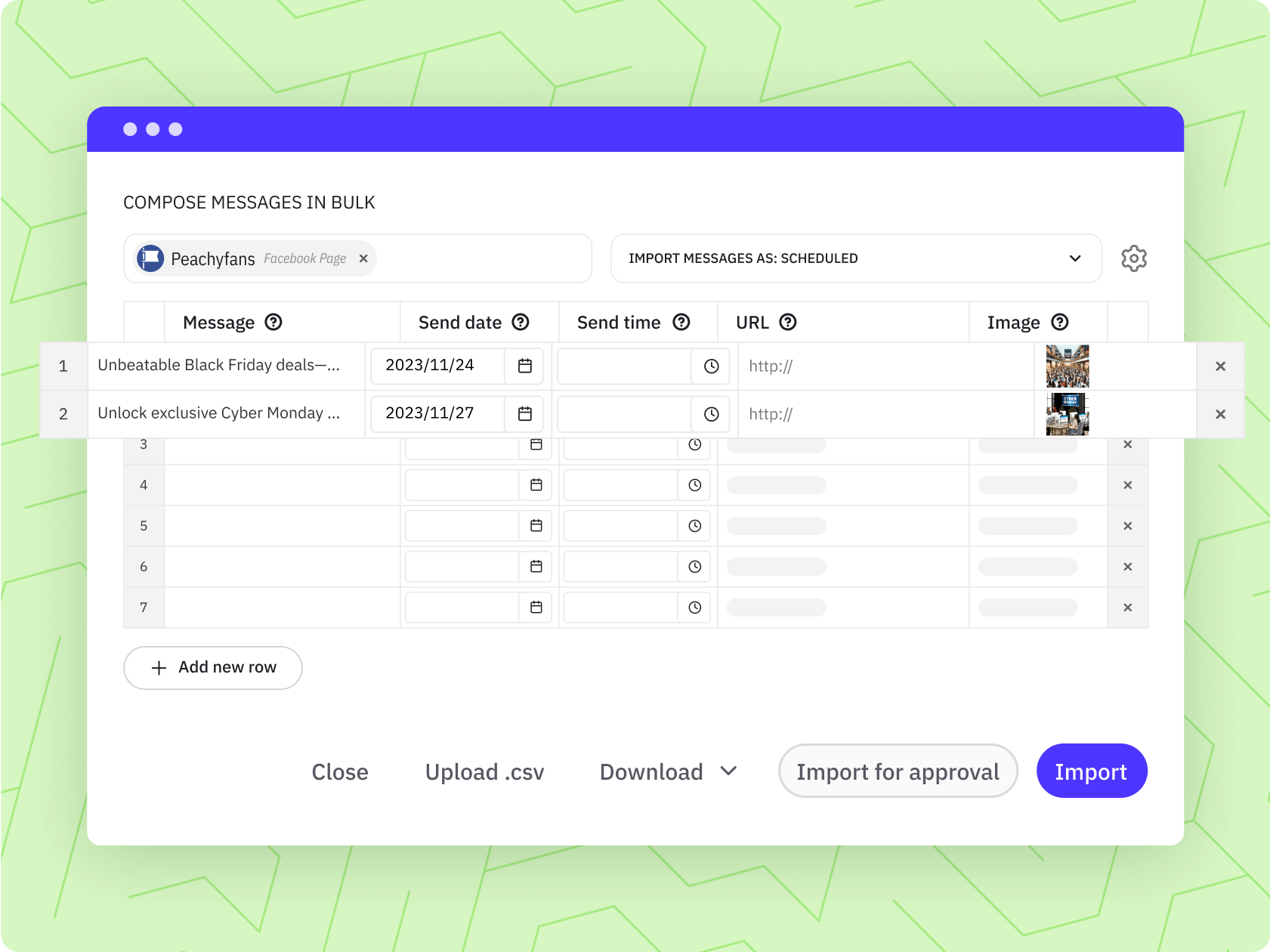
Add multiple Facebook Pages at once, group locations into Profile Lists (up to 50 profiles per list), and bulk import a CSV of posts to publish across the whole list in one go.
Local managers want their own calendar and the freedom to post local updates, without the central office losing oversight.
Give every location, region or manager their own Calendar View — grouped however your structure works — while Approval Workflows keep everything on-brand underneath.
Each location needs to show up when someone nearby searches for it, not just perform well on social.
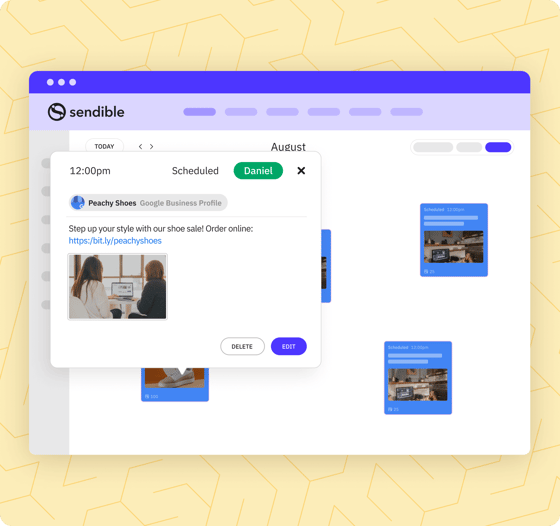
Schedule and manage Google Business Profile updates across every location alongside your social content, from the same place.
Every location does its own thing on social, and the brand starts looking inconsistent across town — or across the country/s.
Route every post through Approval Workflows before it goes live, and give every location the same starting point with a shared, centrally-managed Content Library.
Writing, or approving, the same post 50 times over, once per location, eats up the week.
Write it once. On Elite and Enterprise, Dynamic Fields automatically swap in each location's name, address, phone number, website link or local hashtags, so one post becomes fifty in seconds.
Head office has no idea what's actually happening across the network until a customer complains.
Aggregated reporting shows performance by individual location, region, or the whole network rolled up — so under-performing locations get caught early, not three months late.
Bringing a new location (or a hundred) onto the platform means connecting every account by hand.
Add multiple Facebook Pages at once, group locations into Profile Lists (up to 50 profiles per list), and bulk import a CSV of posts to publish across the whole list in one go.
Local managers want their own calendar and the freedom to post local updates, without the central office losing oversight.
Give every location, region or manager their own Calendar View — grouped however your structure works — while Approval Workflows keep everything on-brand underneath.
Each location needs to show up when someone nearby searches for it, not just perform well on social.
Schedule and manage Google Business Profile updates across every location alongside your social content, from the same place.

How did RE/MAX Realtron scale to 1,200 agents without adding headcount? 

RE/MAX Realtron, the second-largest real estate brokerage in Canada, uses Sendible to support 1,200 agents across 330 social media accounts in Toronto.

“The scheduling component… has saved us hours and hours and hours.”

Louie Bettio, Marketing Director, RE/MAX Realtron

Louie-Bettio-remax-circle

How does Sendible support franchise and multi-location teams?


Sendible supports franchise and multi-location teams with four connected tools: Approval Workflows for sign-off before anything publishes, Dynamic Fields for automatic per-location personalisation, Calendar Views for oversight at whatever level fits your structure, and Google Business Profile scheduling for local search.

Keep the whole network on-brand, without approving every post yourself.
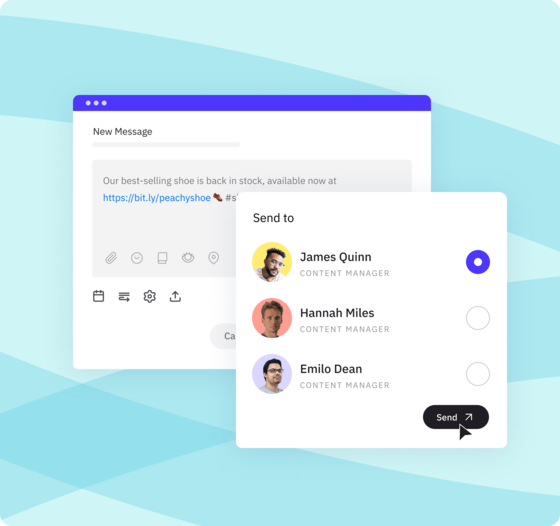
Route content to the right person before it publishes — head office sign-off for national campaigns, regional sign-off for local variations, or both. Nothing goes live off-brand, and nothing gets stuck waiting on you personally. 
Colaboration-post-approval-long
Write one post. Publish it personalised, everywhere.
Build a single piece of content and let Dynamic Fields automatically fill in each location's name, address, phone number, website link or local hashtags. Every location gets a post that reads like it was written just for them — without anyone writing it 50 times. Available on Elite and Enterprise.
custom-content-tags-sales-campaigns-long
See everything, or see just your patch.
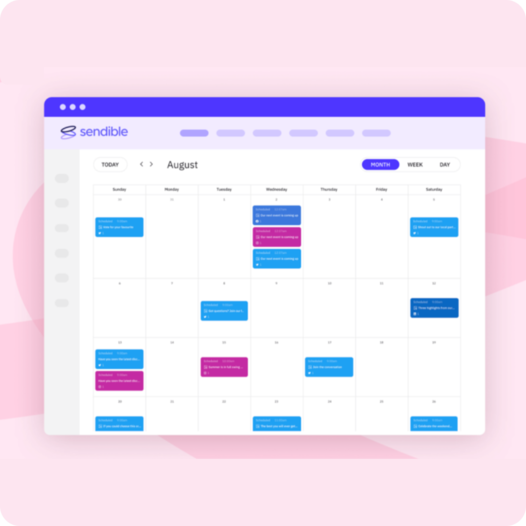
View every location's content on one unified calendar, group it by region or franchise owner, or give each location manager their own individual calendar — whichever matches how your organisation actually runs. 
sendible-monthly-calendar-view
Show up in local search, at every single location.
Schedule and publish Google Business Profile updates across every location alongside your social content — so each location stays visible (and current) when nearby customers go looking.
GBP-scheduling-long
Colaboration-post-approval-long custom-content-tags-sales-campaigns-long sendible-monthly-calendar-view GBP-scheduling-long

“Sendible helps me as a manager be more efficient in seeing what my teams are doing on social media and allows me to reach out to teams that may be falling short.”

Tara, Corporate Director of Sales & Marketing, Sage Restaurant Group

tara-sage-group

How do you spend less time on admin and more time growing the network?

Sendible cuts location-management admin three ways: Profile Lists and bulk post imports to publish across dozens of locations at once, Priority Inbox to pick up comments and messages from your locations' Facebook, Instagram, LinkedIn and YouTube accounts in one place, and Workspace permissions so each location manager only sees their own patch. Not every location needs a dedicated marketer to stay active on this model. 

bulk-import-feature-plan-short

Publish to multiple locations as easily as one.

Group your locations into Profile Lists — up to 50 profiles per list, organised however suits you, by region, brand or campaign — then bulk import a CSV of posts to schedule across the whole list in one go.

content-library-management-system-user-permissions-short

Give every location manager access to their patch — and nowhere else.

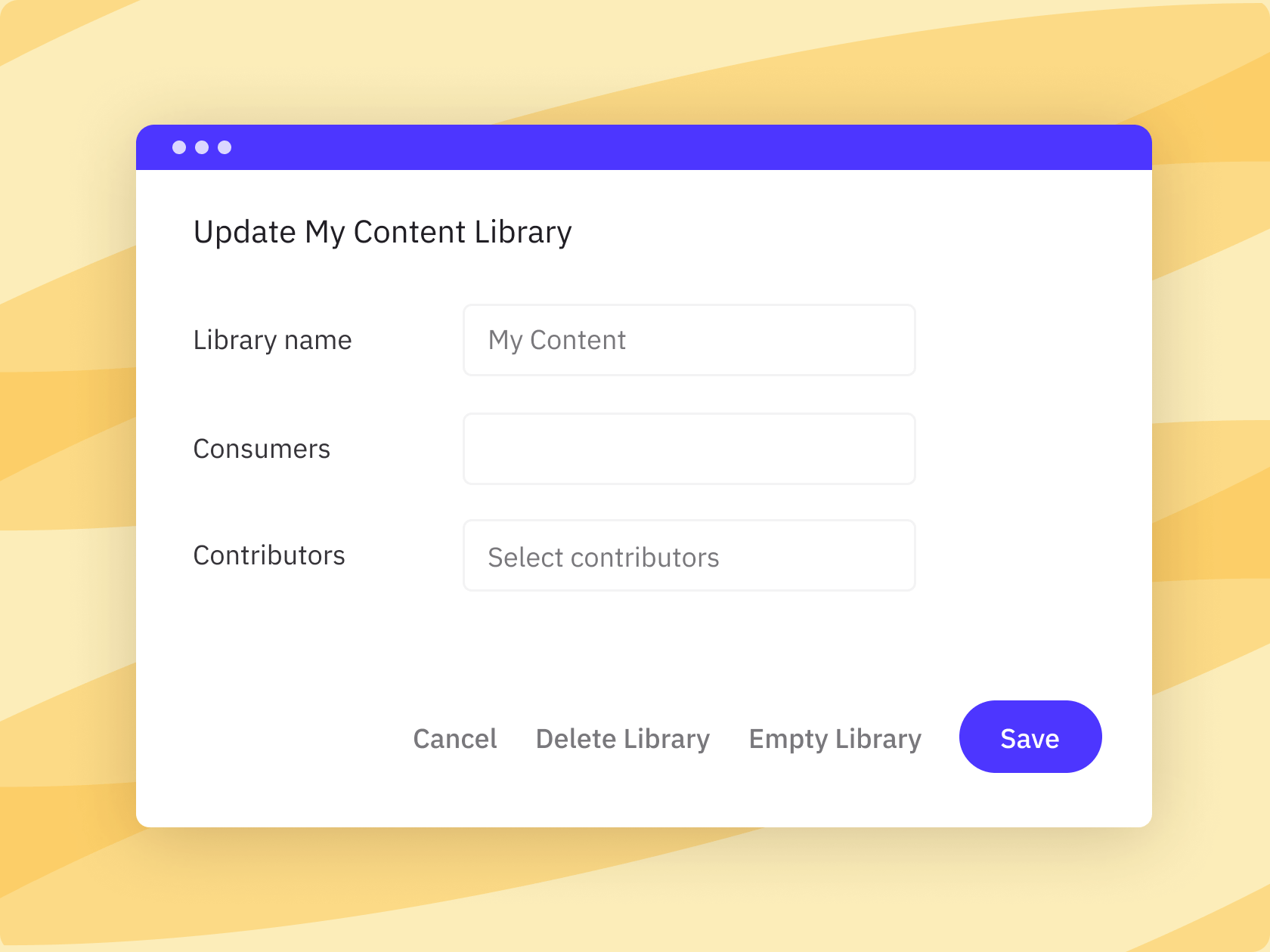
Set exactly what each location manager, regional lead or head office user can see and do. Local teams get the access they need; head office keeps the oversight it needs — and it's all unlimited users, so adding another location manager never adds cost.

priority-inbox-feature-inbox-short

Comments and messages from across the network, in one place. 

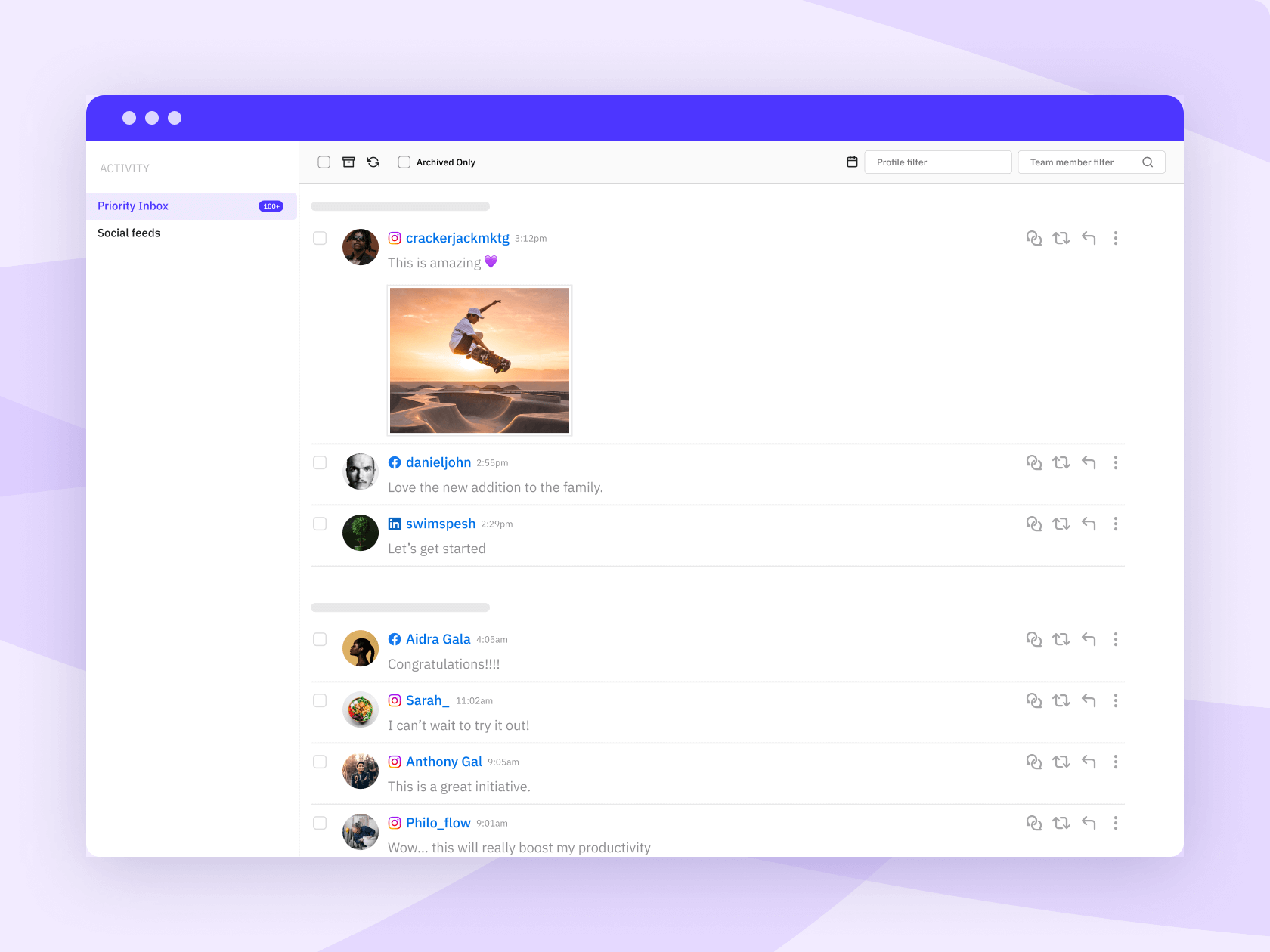
Priority Inbox brings comments and replies from your locations' Facebook Pages, Instagram professional accounts, LinkedIn Company Pages and YouTube into one place, along with Facebook Page direct messages — so head office or a regional lead can catch and respond to customer activity without opening each account individually.

UNLIMITED USERS

How much can multi-location teams save with Sendible? 

Compare the numbers. While enterprise competitors charge you for every location manager you add, Sendible gives you flat-rate pricing and unlimited users — so growing the network never grows your software bill. 

Start your 14-day free trial
Feature
Sprout Social
Hootsuite
Agorapulse
SocialPilot
Buffer
Sendible
Sprout Social
Hootsuite
Agorapulse
SocialPilot
Buffer
Sendible
Cost for 5 team members on most popular plan
More information
Based on top mid-tier plans (Sprout Professional at $299/seat, Hootsuite Professional at $199/seat, Agorapulse Advanced at $199/seat). A 5-person team costs $995–$1,495+/mo on competitors vs. Sendible’s $199/mo flat rate.
$1,495/mo (billed annually)
$995/mo (billed annually)
$745/mo (billed annually)
$169/mo (billed annually, flat rate)
Plan choice and flexibility
More information
Avoid forced enterprise upgrades just to unlock extra seats or client profiles. Choose a plan tailored to your workflow and add dedicated workspaces à la carte whenever you scale.
4 rigid plans (forced tier upgrades)
5 flexible plans (add extra Workspaces à la carte)
Cost to add one more location manager
More information
Most enterprise social media management tools offer per-seat charging. With Sendible, you don't get taxed per-seat.
+$299/mo (Professional, billed annually)
+$199/mo (Professional, billed annually)
+$149/mo (Advanced, billed annually)
$0 — unlimited users on every plan

What does Joe Zeplin's review of Sendible show?

Joe Zeplin reviews Sendible for managing multiple brands and locations, walking through the platform in his own words rather than ours — a closer look at how it actually handles multi-location accounts in practice. 


What resources are available for franchise and multi-location teams? 

Four resources cover the most common next steps: a guide to multi-location social media management, an article on franchise-specific strategy, Sage Restaurant Group's case study on managing collaboration across 14 locations, and Sendible's 2025 social media management buyer's guide.

multi-location-social-media-management-featured-image-new
Guide

Multi-Location Social Media Management: Everything You Need to Know

social-media-management-for-franchise-businesses-with-sendible-featured-image
Article

Social Media Management for Franchise Businesses with Sendible

featured-image-sage
Case study

How Sage Restaurant Group improved collaboration across 14 locations

2026 buyers guide
Guide

Social Media Management Buyer's Guide

Frequently asked
questions.

Approval Workflows let you restrict specific team members — junior staff, interns, or anyone new to a location — so every post they schedule needs sign-off before it goes live and automate that rule so you're not manually checking each one. Set it once per person; Sendible enforces it every time.

No. On every plan, you can publish one post to all your locations at once with Profile Lists. On Elite and Enterprise, Dynamic Fields go further and personalise that post automatically for each location: name, address, phone number, website link, local hashtags, whatever you set up. One post in, dozens of on-brand, location-specific posts out. 

Either — Sendible's Workspace and permission structure is flexible, not fixed. Some franchises give every location its own space and login; others run everything centrally from head office and just review by location. We'll help you find the structure that fits how your organisation actually works, not force you into one model. 

Yes — reporting works both ways: drill into a single location's performance, or view it aggregated across a region or the whole network. That's on top of Report Hub, which lets you brand and automate recurring reports from the Premium plan up (2 reports per Workspace on Premium, 3 on Elite and Enterprise) — handy if you need to send leadership a regular, presentable summary rather than exporting one manually. 

Yes — you can schedule and manage Google Business Profile updates across every location directly alongside your social content, so each location stays current and visible in local search results. 

Cost scales with Workspaces, not headcount — every plan includes unlimited users, so adding more location managers or regional leads never adds cost. How you structure Workspaces (one per location, one per region, or another split entirely) depends on how your organisation runs day to day — book a consultation and we'll help you map it out rather than guessing. 

You can connect multiple Facebook Pages at once rather than one at a time, then group your locations into Profile Lists (up to 50 profiles per list) so you can bulk import a CSV of posts and publish across the whole list in one go, instead of scheduling location by location. 

All the major networks — including Facebook, Instagram, LinkedIn, TikTok, Threads and Google Business Profile. See the full list of supported networks. 

Yes — a 14-day free trial, no card required, no contract, cancel anytime. You can test it against a real slice of your location network before committing to anything. 

Priority Inbox brings comments and replies from your locations' Facebook Pages, Instagram professional accounts, LinkedIn Company Pages and YouTube into one place, along with Facebook Page direct messages, so you — or a regional lead — can catch and respond to customer activity across the network without checking each location's account one by one.